
How it works
Get your wired effects over Bluetooth too.
Use haptic feedback and adaptive trigger effects over Bluetooth in PC games that support them. DS5 Untethered is free and open source. The game sees a wired controller, you play wireless.
The problem
Connect a DS5 to a PC over Bluetooth and what you get depends on the game. Some games still give you adaptive triggers and normal rumble, but the haptics that let you feel small details like raindrops and the ground under you need a USB cable.
- Game
- Virtual wired DS5
- Bluetooth
- Your controller
DS5 Untethered finds your controller connected over Bluetooth.
It creates a virtual DS5 that looks wired to the PC. The game sees that one.
The haptics, trigger effects and light commands the game sends go to the controller in your hands over Bluetooth.
DS5 Untethered uses two free drivers, usbip-win2 and HidHide. The Setup page checks for them and walks you through downloading them, pairing and a connection test.
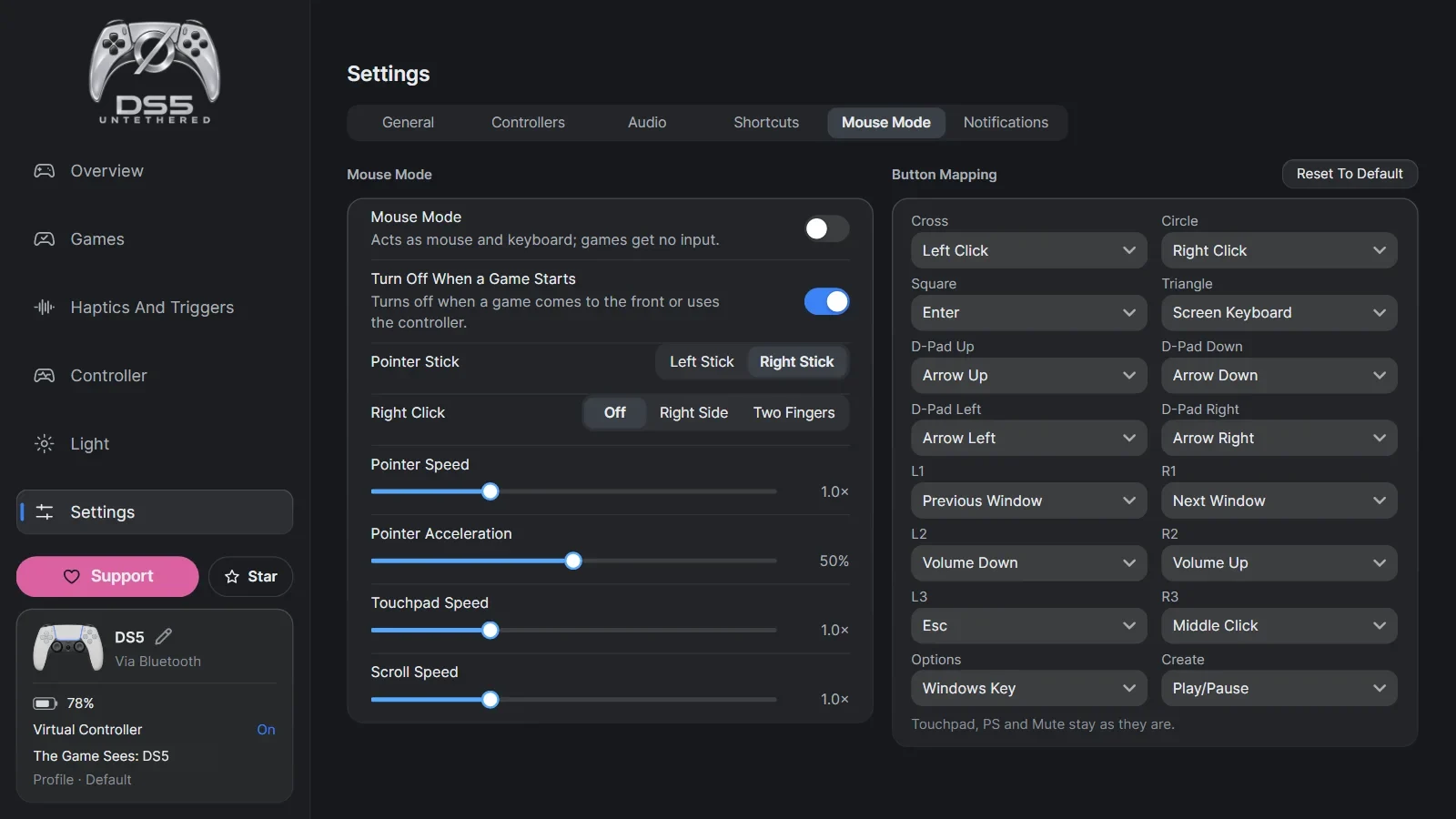
Mouse Mode
Change settings without putting the controller down.
No need to reach for the keyboard and mouse to switch profiles or change trigger strength mid-game. Open the app from the controller, change your settings with the touchpad and get back to your game.
App preview · Overview

Controller in hand, game running
You want to change a setting, but the keyboard and mouse are out of reach.
Short press on ø
The app comes to the front and Mouse Mode turns on.
Move the pointer with the touchpad
Slide a finger on the controller's touchpad to move the pointer.
Press the touchpad to click
Pressing the touchpad is a mouse click. That is also how you open the profile menu.
Choose your profile
For example, switch to Relaxed. The new settings apply right away while the game runs. For right click, you can choose to press the right side of the touchpad or press with two fingers.
Press Back To Game
The game comes back to the front, Mouse Mode turns off and you keep playing with the controller.
Another shortcut
You can also hold ø and press Options to turn Mouse Mode on and off.
Features
Feel the game's own haptics without the cable.
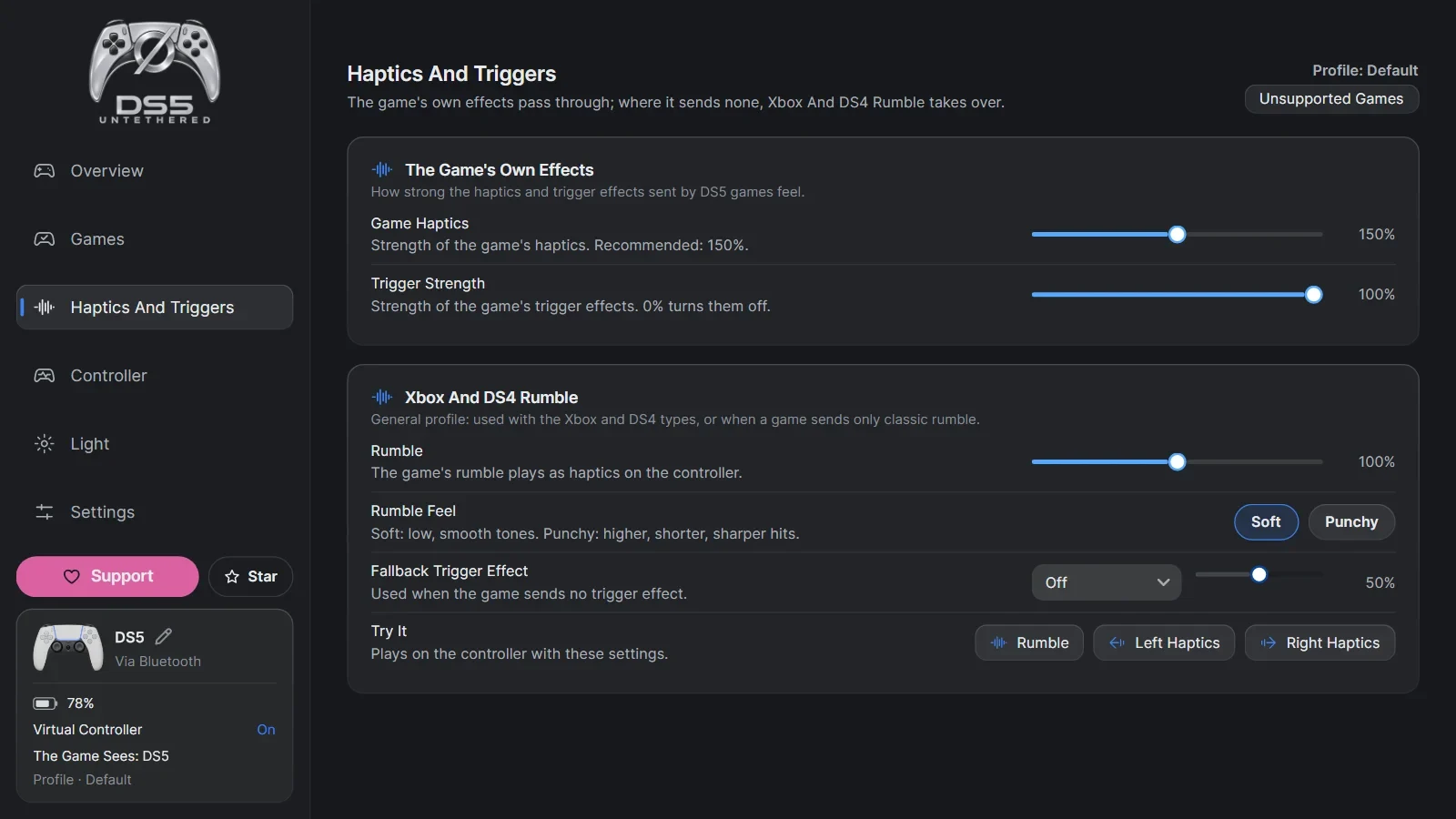
In games that support it, the haptic effects that carry the fine details reach your controller over Bluetooth. So when you play wireless, you feel them on top of the normal rumble.
Feel the trigger resistance when you play wireless too.
The adaptive trigger effects a game sends for throttle, brakes or weapons reach your controller over Bluetooth. You can set the trigger strength to your liking and keep the effects.
Feel Xbox trigger rumble on your DS5.
Some games give you the feel of throttle, brakes, ABS or wheelspin by rumbling the triggers of an Xbox controller. DS5 Untethered recreates these effects with the DS5's adaptive trigger motors.
Turn it on in Settings → Controllers → Triggers or on the app's Games page. It is off by default.
Details
With this on, the game sees the controller as an Xbox Series controller, and its trigger rumble goes to the DS5. In your profile, pick the feel you want: Xbox-Like, Soft or Sharp.
The app recognizes games known to support trigger rumble, and its game list gets updated.
Let the game's colours show on your controller.
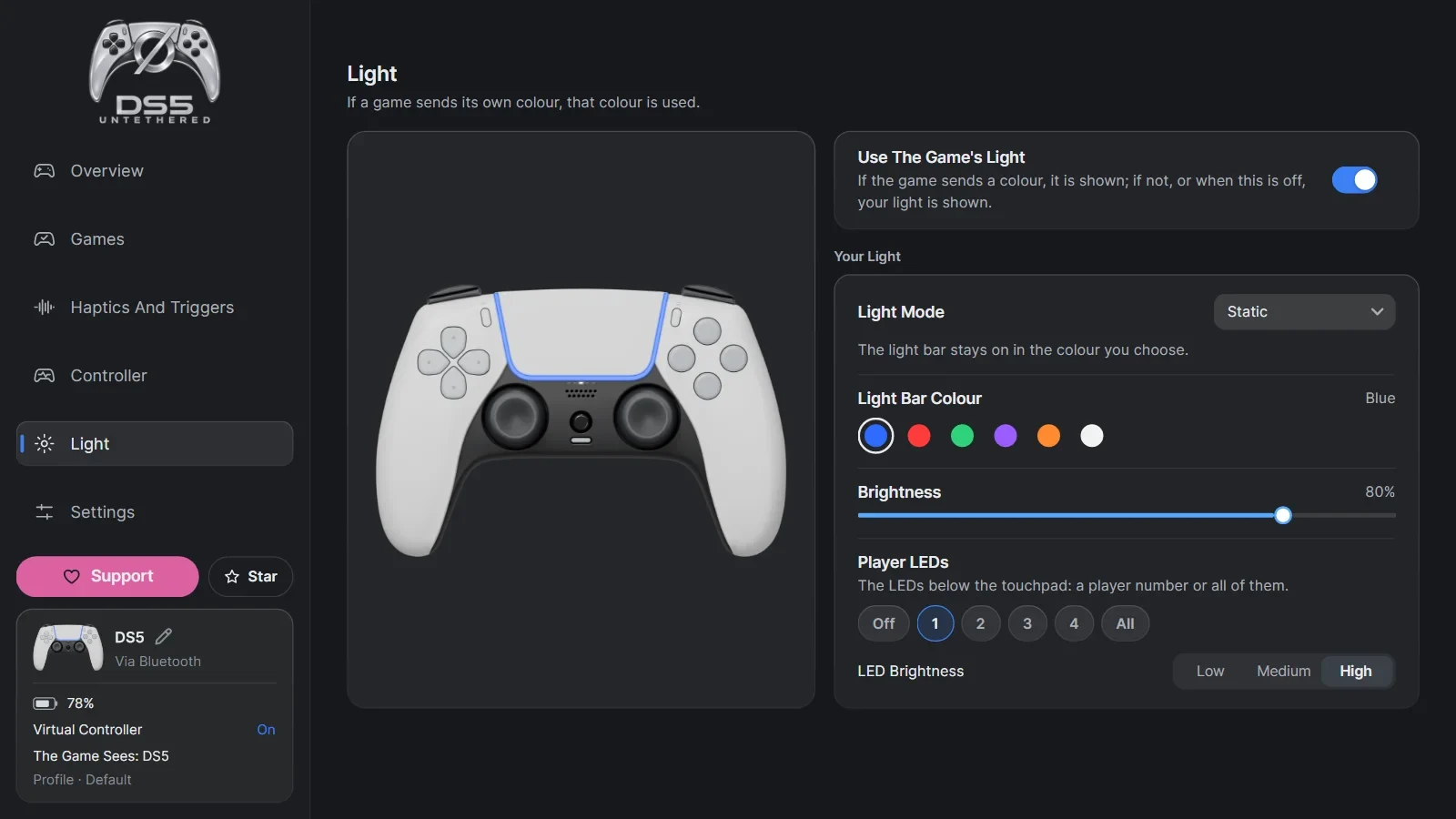
The light effects a game sends reach your controller over Bluetooth. You can also pick your own colour and effect in the light settings.
Pick a colour to see how it looks on the light bar.
Use your controller's microphone and speaker wirelessly.
Use the DS5 microphone in apps like Discord, and turn it on and off with the controller's mic button. In games that support it, sound sent straight to the controller speaker plays over Bluetooth too.
To hear all of your PC's sound from the controller, choose Controller Speaker as the sound output in Quick Settings.
Add rumble to games without DS5 support.
Turn Sound Into Haptics makes rumble from the game's sound. Use only the bass or the full sound, and set how strong the rumble is.
Classic rumble sent for Xbox and DualShock 4 controllers also plays on the DS5's haptic motors. You can change its strength and feel.

Profiles
Set up every game your way.
Save your rumble, haptics, trigger and light settings in profiles. One game can have several. For example, one with strong effects for racing and another with light rumble for when you want to play calmer.
Open a game's settings on the Games page to create, rename or duplicate a profile. Switch profiles on the Overview page or in the game's settings. Changes apply right away while the game is running.
These are example profiles. You choose their names and settings.
- Racing
- Haptics
- Strong
- Triggers
- Strong
- Light
- Red
- Relaxed
- Haptics
- Light
- Triggers
- Light
- Light
- Amber
- Strong Rumble
- Haptics
- Strong
- Triggers
- Medium
- Light
- White
What else is there?
Connection and game settings, all in one app.

- The games' own haptic feedback and adaptive trigger effects
- Haptics and trigger strength
- Xbox trigger rumble
- Rumble made from game sound
- Light bar and light effects
- The controller's microphone, and its speaker in games that support it
- Button remapping and gyro aim
- Mouse control with the touchpad or a stick
- Separate settings and several profiles for each game
- Finds your Steam and Epic Games games
- DS5, DualShock 4, Xbox Series or Xbox 360 for each game
- Picks the right controller type for each game on its own
- Hides the real controller from games with HidHide
- Bluetooth adapter test and live connection info
- Reconnection, low battery warning and power-off when idle
- DS5 Edge support
- Remembers up to four controllers, and you can name them
- In-app updates

Download it and play wireless.
Download for WindowsView the source code Discussions
Runs on Windows 10 and 11. Download it on your PC.
DS5 Untethered is free and will stay free. If it helps you, give it a star on GitHub. If you want to help its development, you can support it on GitHub Sponsors.
Quick Start
- Download
DS5-Untethered-<version>-Setup.exefrom the latest release on GitHub and run it. - Install the usbip-win2 and HidHide drivers. Installing them needs administrator rights.
- Pair the DS5 in the Windows Bluetooth settings.
- Open DS5 Untethered and finish the steps on the Setup page. The app checks the drivers and the Bluetooth connection.
- Start a game that supports them and get its haptics and trigger effects wirelessly.
Stuck? Ask in Discussions on GitHub.
Requirements
- Windows 10 or Windows 11
- A DS5 or DS5 Edge
- Your PC's built-in Bluetooth or a USB Bluetooth adapter
- The free usbip-win2 and HidHide drivers
Installer or ZIP?
The installer is the right pick for most people. It installs the app for your Windows account only, so the app itself needs no administrator rights.
If you prefer the ZIP, extract it to a folder and run Kopru.App.exe.
Both come with the .NET parts they need, so you do not have to install .NET. Both also need the usbip-win2 and HidHide drivers, and installing those needs administrator rights.
The app is not digitally signed yet, so Windows SmartScreen may warn you. Make sure the file you downloaded comes from the project's official GitHub releases.
Change settings without leaving the game
A short press on ø brings the app to the front. Mouse Mode turns on by itself: move the pointer with the touchpad and press the touchpad to click.
When you are done, press Back To Game. Mouse Mode turns off and you keep playing with the controller.
Screenshots
Frequently asked questions
Do DS5 haptics and adaptive triggers work over Bluetooth on PC?
It depends on the game. Some games send adaptive trigger effects and normal rumble over Bluetooth. The detailed, audio-based haptics need a wired connection.
DS5 Untethered creates a virtual DS5 that the game sees as wired, and sends those effects to your controller over Bluetooth.
Some of my games already have triggers and rumble over Bluetooth. What does the app add?
The rumble and trigger effects you feel can come from the game's own Bluetooth support. What is missing is the audio-based haptics that let you feel small details like raindrops and the ground under you.
DS5 Untethered sends the haptics a game gives a wired controller over Bluetooth too. Play the same scene wired and wireless to compare.
Do I need a special adapter or extra hardware?
No. Your PC's built-in Bluetooth or a standard USB Bluetooth adapter is enough. You can also test the adapter on the Setup page.
How much delay is there?
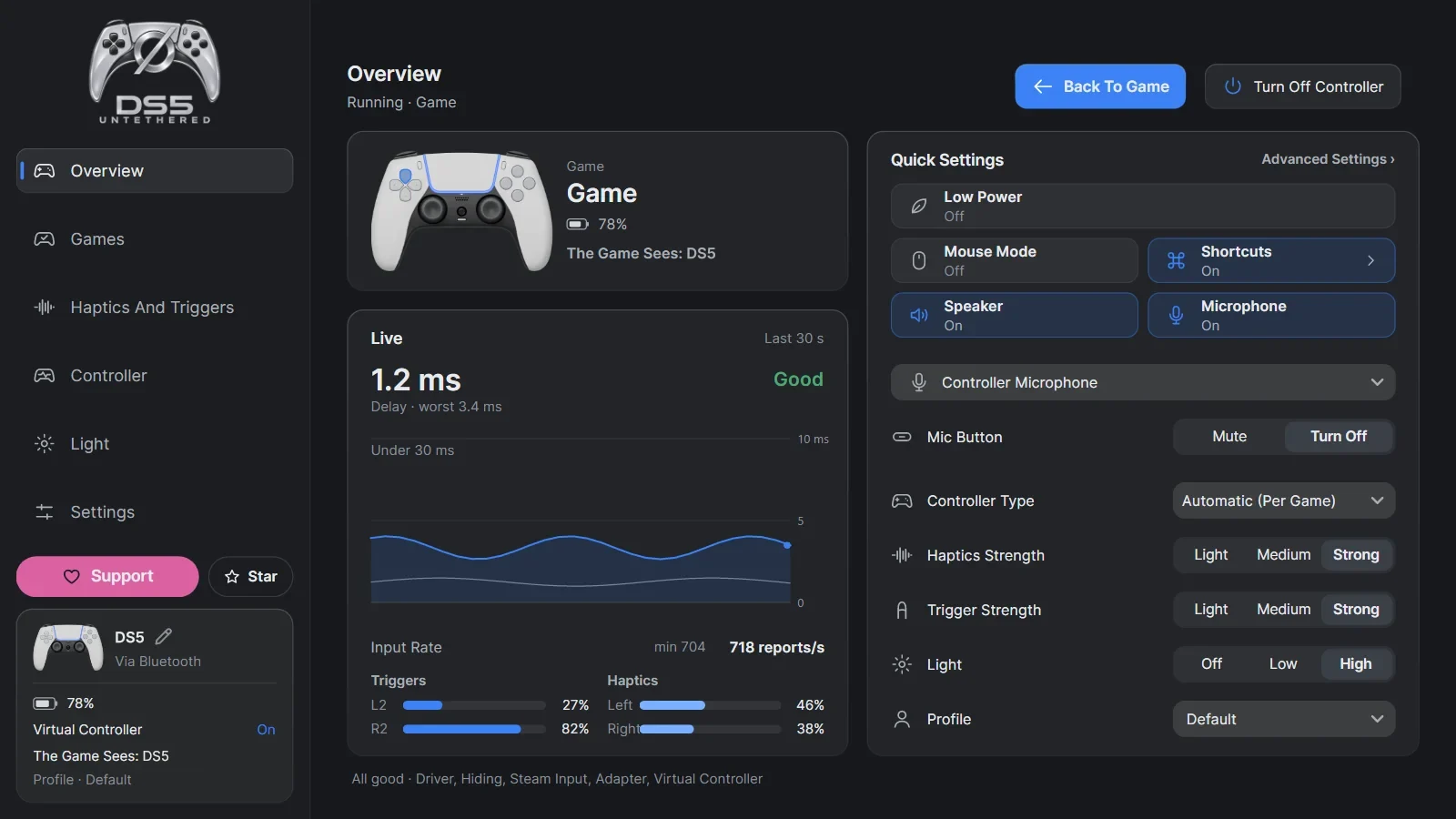
It depends on your Bluetooth adapter and connection conditions. The Overview page shows the live connection delay and input rate.
Which games does it work with?
Games that support the DS5's haptics or adaptive triggers over USB. The games the app recognizes are listed on its Games page.
For games without DS5 support, you can use the classic rumble settings, custom trigger profiles and haptics made from the game's sound. Games that support Xbox trigger rumble have their own option too.
Can I change settings without leaving the game?
Yes. A short press on ø brings the app to the front and turns on Mouse Mode. Change your settings with the controller's touchpad, then press Back To Game to keep playing.
Is it free?
Yes. DS5 Untethered is free and open source, and it will stay free. There is no paid version and no paid feature. Supporting it on GitHub Sponsors is completely optional.